
Google Tag Manager for Small Business: Do You Need It, and How to Use It Safely
What Google Tag Manager does, whether a small business needs it or can use the Google tag alone, how to install and test it, who should hold publish access, why custom HTML tags need care, and two changes Google announced in October 2026.

zabil

Google Tag Manager shows up in almost every analytics guide, and it is easy to come away thinking every website must have it. Many small business sites do not, and some that have it would be simpler without it. This guide explains what Tag Manager does, when it earns its place, and how to set it up so a mistake does not break your tracking. It is based on Google’s Tag Manager and Analytics help pages as we read them on 19 October 2026, and we mark where we are giving our own opinion. Google also published two Tag Manager changes this month, covered near the end.
What Google Tag Manager is
Google describes it as “a tag management system that allows you to set up and manage tags on your site without changing your website’s code.” You add two snippets of code to each page once, then manage the rest from the Tag Manager website. Four ideas are worth knowing:
- Container. The bundle of tags, triggers and variables installed on a website or app.
- Tag. Code that sends data to another system, such as Google Analytics or a Google Ads conversion tag.
- Trigger. It “listens for certain events, such as clicks, form submissions, or page loads,” and tells the tag when to fire.
- Variable. A “named placeholder for a value that will change, such as a product name, a price value, or a date.”
Google also says that if your tags only need to fire on page loads and need nothing beyond the URL and referrer, you only need the container snippet and “A data layer implementation is probably not necessary.”
Do you actually need it?
Google’s own comparison page is useful here. It says the Google tag is “the basis for all measurement use-cases,” and that using it alone is “great for marketers who don’t have a web development team readily available or use a content management system (CMS).” Its next line is the one to remember: “If you only need the default metrics, such as page views, clicks and scrolls, you can set up the Google tag once and you’re all set.”
Google Analytics also has enhanced measurement, which records page views, scrolls, outbound clicks, site search, video engagement, file downloads and form interactions, with “No code changes” required. Check what that already covers before adding anything.
Google describes Tag Manager as best for people “in charge of tagging” who “need to manage Google and tags from other parties,” and as a good option for agencies. Our view, as a rule of thumb:
- You probably do not need it yet if you have Google Analytics with its default events and nothing else.
- It starts to pay off when you run Google Ads conversion tracking alongside Analytics, add a Meta pixel or other third-party tag, or need to record events such as phone and WhatsApp taps, as in our GA4 enquiry tracking guide.
One rule matters more than the rest. Google’s troubleshooting page says: “You should only use either the Google tag or Tag Manager, not both. Using both methods will have unintended consequences, such as overcounting data from your website.” If you move to Tag Manager, remove the old Google tag snippet.
Setting it up safely
- Create the account and container. Google says one account per company is typical and that the web container should be named after your website’s top-most address, such as www.example.com. You do not need a container for each page.
- Install the two snippets. Google says the first goes “as high in the <head> of the page as possible” and the second “immediately after the opening <body> tag.” On WordPress this is usually done with a plugin or a theme setting. If you are unsure, ask your developer rather than pasting code into theme files.
- Add your Google tag. Google notes that the old GA4 Configuration tag “is now the Google tag.” Your event tags stay the same.
- Build one thing at a time. Create a tag, give it a trigger and test it. Google’s example is a trigger that fires only when the Page URL contains a certain address.
- Use Preview. Preview mode lets you browse your site “as if the current container draft was deployed,” so you can test before it is published. Google says the debug panel is not visible to regular visitors.
- Publish with a clear name. Google says to publish your changes by clicking Submit: “Otherwise, you won’t see data in Google Analytics.” Use a version name like Google’s example “GA page view tag – initial launch”. If something breaks, you can revert to an earlier version.
- Test with a real enquiry. Send yourself a form message or tap your own phone link, then check Realtime in Analytics.
Who holds the keys
Tag Manager has four container permission levels: Read, Edit, Approve and Publish. Edit can change a workspace but cannot publish; Publish has full rights. Give Publish to as few people as your business needs.
Google also says to keep at least two active administrators, and to make sure “your account is managed by someone in your organization, not an external agency.” If an account loses its last admin it is deleted, and users with Read access have 30 days to export it. This is the same ownership problem we describe in who owns your website.
Be careful with custom code
Tag Manager lets you paste in a “Custom HTML” tag for tools it does not support natively. Google’s advice: “The best way to avoid performance and malware issues is to use the tag templates built into Tag Manager.” Its malware page explains that a vendor can become infected through tainted third-party libraries and pass that malware to your site via a custom HTML tag, usually “through no fault of your own.” Google scans containers and will not fire tags that point to sites where malware is found.
Our suggestions: paste code only from vendors you trust, review the Versions screen to see who changed what, and remove tags for tools you no longer use. If your site has been compromised, see WordPress site hacked: what to do first. Google’s enhanced measurement page also says: “You’re required to ensure that no personally identifiable information is collected.” For the Indonesian context, see the PDP law and your website.
Two Tag Manager changes in October 2026
Google’s release notes list two changes this month:
- 8 October: gtag(‘config’) behaviour. All container snippets now “initialize on container load, regardless of any gtag(‘config’) commands,” and config commands “will now surface in the dataLayer as visible gtag.config events.” Google warns that if your containers use wildcard custom event triggers, “this change may cause those tags to fire.” Most small sites will not notice, but if someone built custom triggers for you, ask them to check in Preview that nothing fires twice.
- 12 October: container optimisation. Containers can now send data directly to Google measurement products, which Google says gives faster website performance. Google says “no changes will be made automatically, and you can choose whether to adopt the new configuration,” and that you can preview all changes before publishing. Only people with edit, approve or publish access can start it.
If you would like a second pair of eyes on your measurement setup, see our systems and technology services or tell us about your business.
Sources, all read on 19 October 2026: Tag Manager Help on the introduction, components, Tag Manager vs gtag.js, preview and debug, publishing and versions, users and permissions, custom tags, malware detection and release notes; Analytics Help on enhanced measurement and troubleshooting tag setup.
Layanan terkait
Karya terkait
Di mana ini telah diterapkan.
Jasa Profesional
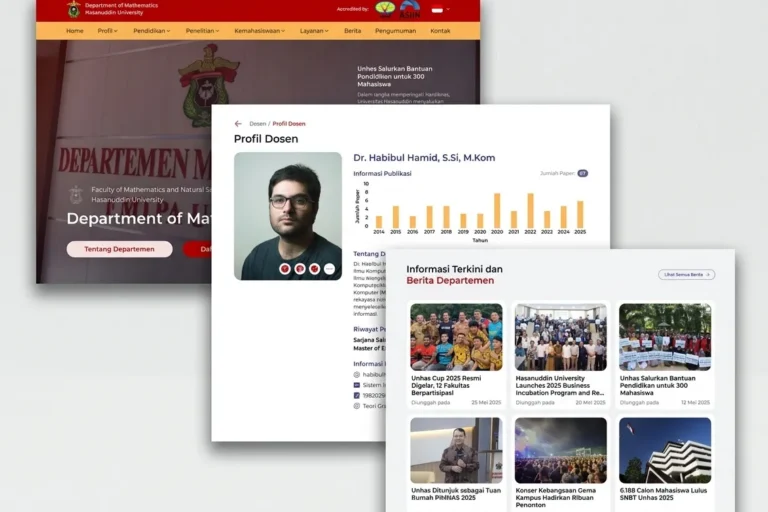
Departemen MIPA UNHAS
Universitas Hasanuddin
Website resmi departemen yang menyajikan informasi akademik, berita, dan kegiatan, dibangun agar staf dapat mengelolanya sendiri tanpa bantuan teknis.
Jasa Profesional
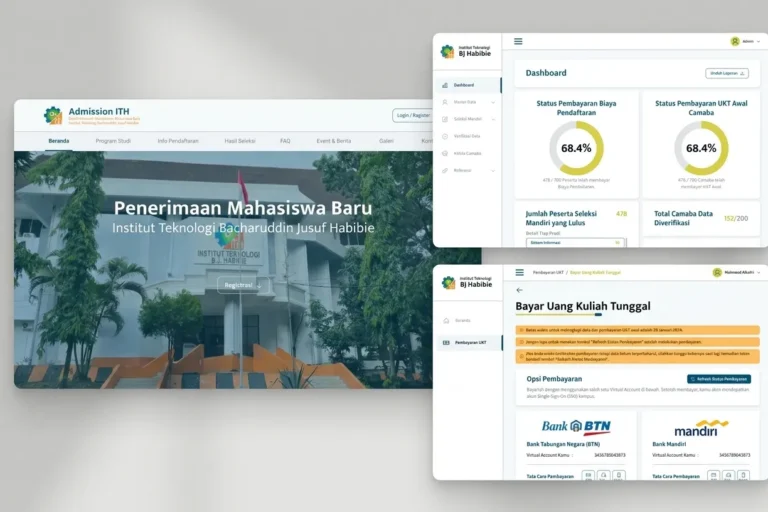
Admission ITH
Institut Teknologi BJ Habibie
Platform pendaftaran mahasiswa baru yang menangani seluruh proses pendaftaran secara online, mulai dari pengisian formulir, unggah dokumen, hingga pembayaran awal.
Local & Growing Businesses
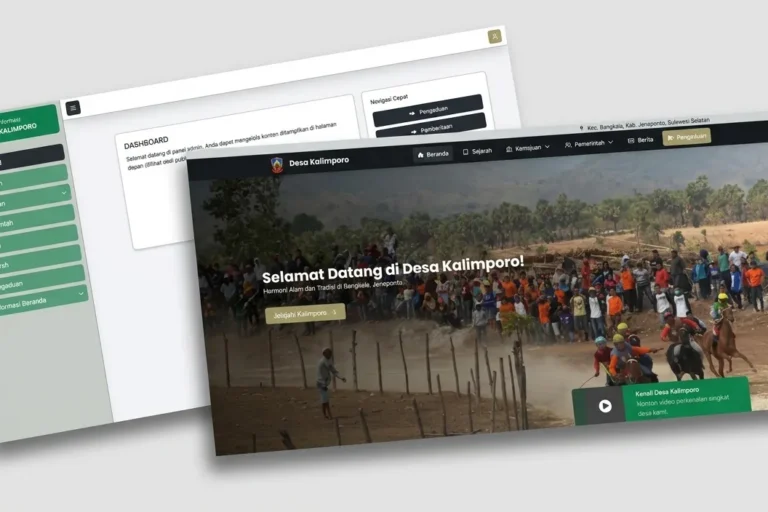
Desa Kalimporo
Desa Kalimporo
Platform profil desa yang menyajikan struktur pemerintahan, data kependudukan, potensi lokal, dan program desa kepada khalayak yang lebih luas.
Baca lebih lanjut
Artikel terkait.

Web Development
Your Connection Is Not Private: What It Means for Your Website and How to Fix It
What the 'Your connection is not private' warning means for a business website, how to tell a visitor-side error from a site fault, how…

Web Development
Booking System for Your Business: Off-the-Shelf, Plugin or Custom-Built?
Should your business use a SaaS booking tool, a WordPress plugin or a custom build? How to compare them, the one question that exposes…

Web Development
Payment Gateway in Indonesia: How QRIS, Virtual Accounts and E-Wallets Fit Together
QRIS, virtual accounts and e-wallets compared, what changed in QRIS fees on 1 October 2026, why a payment is a state machine and not…